The University offers students and staff access to a secure artificial intelligence (AI) chat tool, from the suite of Copilot tools provided as part of its Microsoft licensing agreement. This tool is called Microsoft 365 Copilot Chat (Chat 365). While using AI tools it is essential to use them in an appropriate and ethical way some guidance on the use can be found here and for guidance on Gen AI and Copyright: . Guidance on the use of of Generative AI in Learning, Teaching, and Assessment can be found here
Copilot 365 chat vs Copilot 365
| Copilot 365 chat | Copilot 365 |
|---|---|
| Microsoft 365 Copilot Chat | Microsoft Copilot for Microsoft 365 |
| Available to all staff and students | Available to individual staff via licence, at additional cost |
| Ask questions or request help across your entire organization’s data—emails, files, chats, and more—in one place | Built into apps like Word, Excel, Outlook, and Teams to help you work by creating content, summarizing information, and automating tasks directly within those apps |
| Acts like a central hub for broader questions and insights across your work. | Copilot 365 can act as your assistant for specific tasks inside each app. |
| Covered by University’s Enterprise Data Protection agreement | Covered by University’s Enterprise Data Protection agreement |
Security of Protection
Unlike other AI tools, Chat 365 is protected by the University’s Enterprise Data Protection agreement with Microsoft (so long as you are logged into your University account when you access it), ensuring safe usage of University data. This means two things.
- When you ask a question of Chat 365 it asks the Internet and the AI’s internal data. Lt can also use any data or documents you have access to on the University’s Microsoft services (Teams, SharePoint, Outlook etc.), to formulate its response.
- It also means that the data in Microsoft Chat 365 – about the prompts you use to question it, the responses it generates and any documents that you upload into your prompt will not be available to any unauthorised users. Instead it remains within the University’s Microsoft service.
More information is available at: Enterprise data protection in Microsoft 365 Copilot and Microsoft 365 Copilot Chat | Microsoft Learn
This does mean that you are safe to use University information in your questions and it will not leave the University. It also means you must take care to ensure the answers are appropriate before using them further, as it may include confidential data that only specific individuals should have access to (you being one of them). You should only use information in your questions (or the documents uploaded with them) that is permitted to be stored on the University’s environment and inline with data policies. If you are using personal data in an AI tool, you should do a DPIA beforehand to ensure that any use of personal data complies with data protection legislation. Similarly if you are using confidential information in an AI tool you should ensure that you understand and assess the risks of uploading such data, and ensure that the data is appropriately managed and secured.
How to access Chat 365
Chat 365 can be accessed via:
- Online by logging into Microsoft Copilot online.
- Via the Microsoft Copilot App on your mobile device on your mobile device (available for download in your device App store)
- Through many Microsoft Products automatically – e.g. Edge Browser, Edge – by clicking on the Microsoft Copilot Icon
Always ensure you are logged in with your University Account to ensure you are within our Enterprise Data Protection’s environment. Chat 365 . You must not use personal versions of Copilot of University business, as the appropriate contractual clauses and protections will not be in place.
More information on the use of Copilot can be found at the Copilot learning hub
Additional AI tools for staff
While Chat 365 is available to all students and staff, some staff members will soon be able to gain access to enhanced AI capabilities within Microsoft Office. This advanced functionality is referred to as Microsoft 365 Copilot (Copilot 365) you can view the differences here.
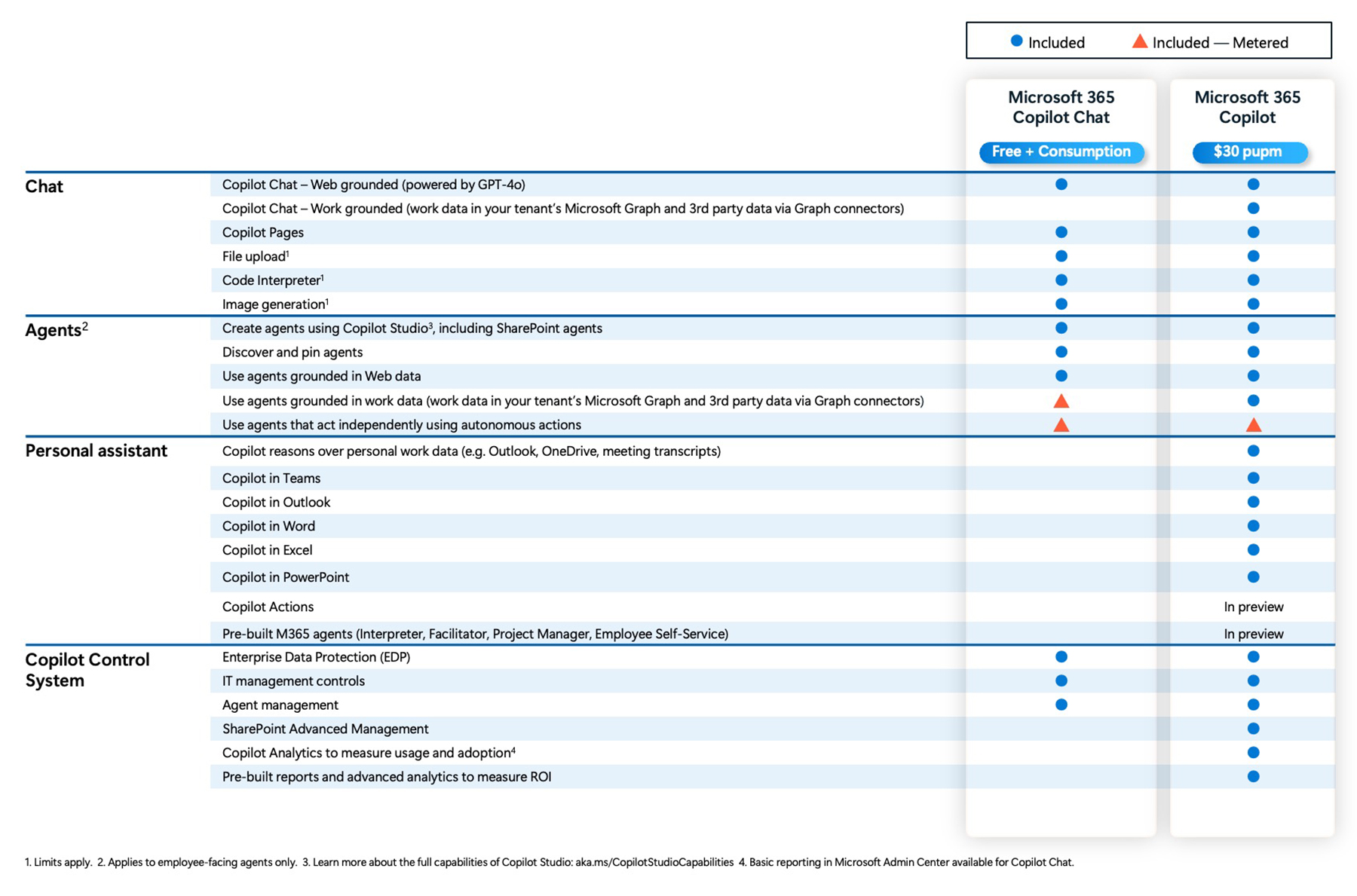
Both Chat 365 and Copilot 365 utilise the Microsoft Prometheus model, which is built on OpenAI’s GPT-5. These tools offer access to technology similar to GPT-5, while remaining within the University’s Enterprise Data Protection framework with Microsoft, allowing a protected environment in which to handle safe handling of University data .
Copilot 365 Licensing
Copilot 365 is also covered by the Enterprise Data Protection agreement, these licenses incur an extra cost for the University .
About Chat 365
Chat 365 is a secure, AI chat experience included with many Microsoft 365 business subscriptions and is based on ChatGPT. It allows users to interact with a powerful AI model, based on information from the web. You can use it to summarise documents you upload, generate images, or get general information, all with enterprise data protection.
About Copilot 365
Copilot 365 is more comprehensive and deeply integrated AI assistant that costs an additional fee per user per month. It includes all the features of Chat 365 but improves the benefits by connecting to the organisation. This means it can access and process your University emails, meetings, chats, and documents stored in SharePoint, OneDrive, and Teams. This integration is the key difference, enabling Copilot 365 to perform highly specific and personalised tasks, such as summarising meetings, drafting a business proposal based on a specific set of documents, or analysing data within Excel.
Essentially Chat 365 is a tool for general AI assistance whereas Copilot 365 more of a co-worker, working directly within your Microsoft 365 apps and leveraging your data to help you be more productive.
We will be introducing a process to request this additional licences through the faculties at £20 per person per month (subject to change).
Accessing Copilot 365
Departments can request a license for Copilot 365 at an additional cost (see below – How to request Copilot 365). This tool is also covered by the University’s Enterprise Data Protection agreement, meaning that University data is held in a secure environment.
Copilot 365 can be accessed via:
- Online by logging into Microsoft Copilot online.
- Via the Microsoft Copilot App on your mobile device (available for download in your device App store)
- Through many Microsoft Products automatically – e.g. Edge Browser, Edge – by clicking on the Microsoft Copilot Icon
No matter how you access Copilot 365 you must always ensure you are logged in with your University Account! This will ensure that you are within our Enterprise Data Protection’s environment. You must not use any personal versions of Copilot for University business, as otherwise the appropriate contractual clauses and protections will not be in place. Use of personal versions will put University information at risk and could result in a data breach.
More information on the use of Copilot can be found at the Copilot learning hub
Comparing the two tools
Microsoft provides a comparison of Chat 365 and Copilot 365 on its Learn platform.
How to request access to Copilot 365
From the beginning of August 2026 there will be a charge of £20 per person per month using Copilot 365.
If you are in an Academic department or faculty contact your local Faculty IT Manager
If you are in Professional Services
- Contact the Professional Services Helpdesk ps-ithelp@strath.ac.uk
A FMS budget code will be required for the ongoing charges if you are in Professional Services.